26th February 2013 - Fraps 3.5.99 Released
Fraps 3.5 adds the much requested feature to allow AVI movie files larger than 4 gigabytes. Fraps will now write hybrid OpenDML/AVI files and allow large movies on NTFS drives. There's still an option to split at 4 gigabytes for legacy AVI 1.0 support.
Please be aware that the minimum system requirements have changed in Fraps 3.5.0. We now require a CPU with SSE2 instructions (Pentium 4 & above). Windows XP or higher is also now required. If you have an older system (Win2K or non-SSE2 CPU) you can still download the previous Fraps 3.4.7 release from the download page.
Changelog
Fraps 3.5.99 - 26th February, 2013

- Fixed counter not appearing in Aero desktop (DWM) and DX10 games after latest Windows Update

Fraps 3.5.9 - 30th August, 2012

- Fixed crash when initiating loop recording
- Fixed periodic stutter for some users during loop recording

Fraps 3.5.8 - 22nd August, 2012

- Fixed intermittent crash recording from OpenGL games
- Fixed crash when unable to access sound device
- Fixed minor memory leak with Win7/Vista sound recording
- Fixed crash encountered by some users when ending a recording

Fraps 3.5.7 - 14th August, 2012

- Fixed audio sync in long recordings for Windows XP users
- Fixed problem taking screenshots from DWM even with counter on screen
- Fixed 64-bit DirectX 11 games always being recorded in lossless RGB
- Fixed corruption in video when audio source set to 11.25kHz
- Other minor bug fixes

Fraps 3.5.6 - 21st July, 2012

- Fixed microphone drifting out of sync in long recordings under Windows 7 & Vista
- Fixed clipping with audio sources greater than 8 channels
- Fixed audio from mono USB devices only appearing in left channel
- Reduced latency of capture from external inputs

Fraps 3.5.5 - 12th June, 2012

- Fixed black borders captured around GameMaker based games
- Fixed crash in D3D10/11 video recording with 64-bit applications
- Fixed scrambled colors saved with some 10-bit color modes

Fraps 3.5.4 - 30th May, 2012

- Improved capture speed for D3D8 games
- Fixed Max Payne 1 not recording when AA enabled
- Fixed error when initializing DirectX on Windows 7

Fraps 3.5.3 - 27th May, 2012

- Fixed micro-stutter in recorded video after temporary framerate drop
- Fixed missing video frames in some games after rendering paused
- Fixed bug causing error message on startup for some users

Fraps 3.5.2 - 20th May 2012

- Fixed missing audio at end of long recordings
- Fixed error preventing movie playback in Windows Media Player
- Fixed screen freezing when starting video capture in Minecraft & other OpenGL games
- Fixed crash during video mode switch in DosBox

Fraps 3.5.1 - 18th May 2012

- Added support for exFAT drives writing larger than 4 Gigabytes
- Fixed crash when large custom resolutions used in game

Fraps 3.5.0 - 26th April 2012

- Support for large AVI movie files (above 4 Gigabytes) on NTFS drives
- Added option to split AVIs at 4 Gigabytes for legacy AVI 1.0 support
- Fixed loop recording using large amounts of disk space for short clips
- Fixed benchmark logs not being saved if game was quit before benchmark ended
- Fixed View folder not opening window on some machines

- NEW MINIMUM SYSTEM REQUIREMENTS: CPU with SSE2 required (Pentium 4 & above)
- Windows 2000 is no longer supported (Windows XP & above)
22nd October 2011 - Fraps 3.4.7 Released
The latest version of Fraps includes an update to the loop recording mode, allowing you to specify a custom length for the buffer (rather than the default 30 seconds). To activate the recording loop simply press and hold your video capture hotkey until the Fraps counter turns pink, indicating that loop recording has begun.
We have also included new optimizations for recording at high resolutions such as 1920x1080 (1080P). Performance gains should be seen in most OpenGL and DirectX games with Fraps 3.4.
Changelog
Fraps 3.4.7 - 22nd October 2011
- Fixed recording rate being locked to a low multiple when Vsync enabled
- Fixed unlocked recording speed after temporary slowdowns
- Fixed Alt key interference with VMware/remote desktop applications

Fraps 3.4.6 - 31st July 2011
- Fixed overlay color in Fear 3
- Fixed detection of IL2: Cliffs of Dover and Bloodline Champions
- Fixed counter appearing in Thunderbird and Pale Moon applications
- Other minor bug fixes

Fraps 3.4.5 - 28th May 2011
- Fixed some videos being recorded with scrambled colors

Fraps 3.4.4 - 26th May 2011
- Increased performance capturing Vista/Windows 7 aero desktop (DWM)
- Reduced memory footprint of Fraps process
- Fixed Fraps crash while idling on desktop
- Fixed gem glowing while recording The Dark Mod
- Fixed hotkeys not responding when simulated from autohotkey/macro apps
- Fixed graphic corruption in some OpenGL titles

Fraps 3.4.3 - 12th May 2011
- Improved DirectDraw capture speed
- Fixed recording crash on single CPU systems
- Fixed invalid colors/crashing recording from 16-bit color games
- Fixed corrupt/oversized AVIs being written at high resolutions
- Fixed Dirt not loading with Fraps running
- Other minor bug fixes and optimizations

Fraps 3.4.2 - 14th Apr 2011
- Improved OpenGL capture speed
- Fixed freeze when clicking on Minimize button
- Fixed GL state not being restored properly
- Fixed blank video showing in some AVIs

Fraps 3.4.1 - 2nd Apr 2011
- Fixed crash when starting Fraps for some users
- Fixed hotkeys not being detected when modifier keys held
- Fixed keys getting stuck when used by both the game and Fraps

Fraps 3.4.0 - 29th Mar 2011
- Added configurable buffer size for loop recording mode
- Increased video capture performance at high resolutions
- Fixed slow recording of Minecraft at default window size
- Fixed benchmark crashing when configured to stop automatically after 1 second
15th March 2011 - Fraps 3.3.3 Released
Microsoft have just released a new service pack for Windows 7 and we've updated Fraps to support Windows 7 SP1.
There's also a new option in Fraps to only capture the external sound input while a hotkey is pressed. This is
useful for people recording their microphone while using push-to-talk in their voice comms software.
Changelog
Fraps 3.3.3 - 15th Mar 2011
- Fixed mouse not responding in Ragnarok and some applications

Fraps 3.3.2 - 9th Mar 2011
- Added detection of mouse buttons (Mouse3, Mouse4 & Mouse5 can be used as hotkeys)
- Added support for all Ctrl, Shift & Alt combinations for use with Fraps hotkeys

Fraps 3.3.1 - 1st Mar 2011
- Fixed Fraps not detecting Agrar Simulator 2011 and some D3D9Ex applications
- Fixed wrong capture dimensions for Fallout 3/New Vegas & Milkdrop
- Fixed counter showing over frames in IE9 beta
- Fixed stereoscopic capture not working in half-size mode for some games
- Additional minor bug fixes

Fraps 3.3.0 - 22nd Feb 2011
- Full support for Windows 7 SP1
- Added option to only capture external sound input while hotkey pushed (Vista/Win7)
- Fixed stereoscopic 3D capture not working for D3D9 games
- Fixed counter not appearing in Dungeons
10th February 2011 - Fraps 3.2.9 Released
Fraps 3.2 brings a new feature for registered users - loop recording, constantly capture the previous 30 seconds of video.
To start the buffering press and hold the video capture hotkey for a second. The Fraps counter will turn pink to show that video is being cached. When you want to save the action simply tap the capture hotkey and the recording will
continue as normal (including the previous 30 seconds of footage).
Never miss a moment again.
Fraps, or it didn't happen!
Changelog
Fraps 3.2.9 - 10th Feb 2011
- Fixed crash if recording to drive with less than 4 gigabytes free
- Improved sound capture engine for those suffering sync issues
- Fixed 3D browser apps not being correctly monitored in Firefox 3
- Fixed detection of UDK viewport sizes

Fraps 3.2.8 - 3rd Feb 2011
- Greatly reduced CPU usage while recording on most configurations
- Fixed black areas in captures from Flight Simulator (FS9/FSX)
- Fixed counter not showing in correct position for some windowed applications
- Fixed crash when recording DWM at 1366x768 on 64-bit versions of Windows
- Fixed counter appearing in Google Talk

Fraps 3.2.7 - 19th Jan 2011
- Fixed large pause between split AVI segments
- Fixed stuttering when using loop recording on Vista/Win7
- Other minor bug fixes

Fraps 3.2.6 - 24th Dec 2010
- Fixed Fraps not able to initialize DirectX on startup for some people
- Fixed crash while recording that could cause video to be written incompletely
- Fixed rare bug causing graphic corruption of individual frames in recorded movies
- Fixed crash on Windows 2000 machines

Fraps 3.2.5 - 2nd Dec 2010
- Fixed keys sticking/duplicated with Fraps loaded
- Fixed Fraps not capturing in half-size mode for some users

Fraps 3.2.4 - 28th Nov 2010
- Added support for D3D10 & D3D11 stereoscopic 3D Vision capture
- Fixed counter appearing on Windows Live 2011 apps
- Fixed inverted colors in video captured from some DX10 games
- Fixed DWM capture jumping between multiple monitors on Windows 7
- Fixed flickering counter in some OpenGL applications
- Fixed mouse offset in 3D browser apps
- Fixed FRAPS.EXE not appearing signed on some Windows 7 installations
- Fixed systray icon not turning pink in loop recording mode.
- Fixed startup crash on 24-core CPU systems
- Added support for Win7 SP1 RC
- Other minor bug/stability fixes

Fraps 3.2.3 - 14th Jun 2010
- Added support for full-size video capture above 2560x1600
- Fixed crash when loading Fraps under WinXP with 6-core CPU
- Fixed crash when enabling monitor DWM option on some configurations
- Fixed Fraps altering error flag on calls to GL SwapBuffers
- Fixed sound input switching at startup on XP systems
- Fixed counter appearing in VS2010

Fraps 3.2.2 - 31st Mar 2010
- Fixed trouble opening movies with VLC, Avidemux, AVI synth, Virtualdub and some other applications
- Fixed problem capturing stereoscopic movies at 1920x1080 and 1920x1200
- Fixed loop recordings sometimes becoming corrupted

Fraps 3.2.1 - 29th Mar 2010
- Fixed screen capture of large resolutions (ATI Eyefinity)
- Fixed counter disappearing in some games when switching resolution
- Improved recording speed on SLI configurations
- Other minor bug/crash fixes

Fraps 3.2.0 - 26th Mar 2010
- Added loop recording for registered users.  Press and hold video capture hotkey to start 30 second buffer
- Added option to disable stereoscopic capture when running with NVIDIA 3DVision
- Major optimizations for recording from D3D10 & D3D11 games
4th March 2010 - Fraps 3.1.2 Released
Fraps 3.1 gives you the option to capture video with or without a locked framerate. If you have a fast machine you can now play your games at a higher speed than the target movie framerate.
We are also aware that quite a few people with Intel i5/i7 configurations were having difficulty loading Fraps on Windows 7. This issue has been fixed in the new release.
Changelog
Fraps 3.1.2 - 4th Mar 2010
- Fixed STALKER: Call of Pripyat not loading with Fraps running
- Fixed slow recording speeds for some users in Battlefield: Bad Company 2
- Fixed Guild Wars crashing when moving between zones
- Fixed videos being recorded at double width on some nvidia configurations
- Fixed colors being inverted in video captured from some DX10 games
- Fixed multiple FRAPS32.DLL crashes

Fraps 3.1.1 - 11th Feb 2010
- Fixed detection of loading screens when recording with unlocked framerate
- Added product information to installer

Fraps 3.1.0 - 8th Feb 2010
- Added option to capture videos with framerate locked or unlocked
- Fixed startup crash for some Intel i5/i7 configurations under Windows 7
- Minimum recording speed is now 1 fps to allow for time lapse recording
- Fixed vista desktop recording not capturing mouse cursor
- Fixed sound length for Vista/Win7 recordings
- Added large address support to 32-bit codec
- Fixed window starting off screen on some multi-monitor systems
21st November 2009 - Fraps 3.0.3 Released
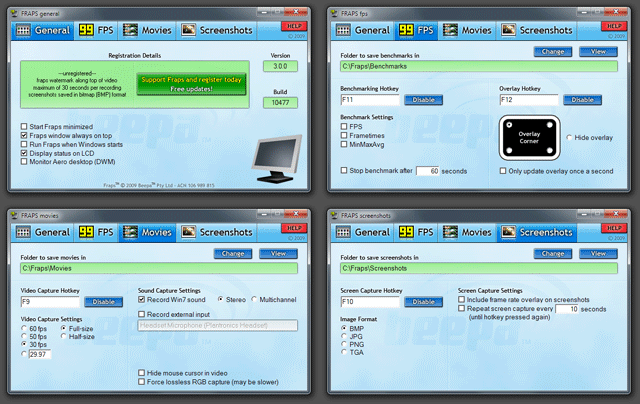 New features and a new look! Fraps is now compatible with Windows 7 and the latest DirectX 11 games.
Ventrilo & TeamSpeak users have long wanted a way to record their microphone and speakers at the same time. For Windows 7 and Vista we've added realtime sound mixing to our video recording so you can now capture both sides of the conversation!
NVIDIA have recently included stereoscopic 3D support directly into their drivers. If you play your DirectX9 (D3D9) game with 3D Vision enabled you can use Fraps to record the game in full 3D too! You'll get a side-by-side stereo AVI recording that you can drop straight in to a stereoscopic 3D player!
Finally, we are aware that more and more people are putting Fraps to professional use. We've added a new option to force lossless RGB compression to ensure that you always have the highest quality video output to work with.
We hope you enjoy Fraps 3!
Changelog
Fraps 3.0.3 - 21st Nov 2009
- Fixed installer not displaying correctly for some users under Win7

Fraps 3.0.2 - 18th Nov 2009
- Fixed inability to put machine to sleep with Fraps running
- Fixed bug preventing people from updating the benchmark timeout value
- Fixed problem restoring Fraps window to previous position upon startup
- Fixed AUDIODG.EXE consuming large amounts of CPU for some users

Fraps 3.0.1 - 8th Nov 2009
- Added minimize to systray option for Win7 users
- Fixed video capture frame rate defaulting to 30 fps when Fraps loads

Fraps 3.0.0 - 5th Nov 2009
- DirectX 11 support
- Compatible with Windows 7 final (RTM) and RC1 versions
- Stereoscopic 3D Vision video capture up to 1920x1200 for D3D9 games
- Force lossless RGB option to always capture video in pure form
- Ability to mix both game sound and external input such as microphone (Vista/Win7 only)
16th October 2009 - Fraps 2.9.99 Released
Fraps has just turned TEN, version 1.0 being released all the way back on August 25, 1999!
Looking back it's kind of hard to believe how much has changed since those early days of DirectX and 3D graphics. From simple beginnings we've seen the prevalence of real-time benchmarking, and the emergence of the amazing machinima community
from video captured in-game.
A very special thank you to all who have helped Fraps evolve and improve over the last decade!
Changelog
Fraps 2.9.99 - 16th Oct 2009
- Fixed flickering video capture in Operation Flashpoint: Dragon Rising
- Fixed 30-bit color captures in Eve Online
- Fixed mouse cursor not being recorded in Conquer Online
- Other minor bug fixes

Fraps 2.9.9 - 29th Aug 2009
- Fixed missing audio in Adobe Premiere and Sony Vegas
- Fixed benchmarks not being written to benchmark folder
- Fixed loading crash when attempting to start Fraps
- Fixed stalling/stuttering after first 4 gig AVI segment
- Fixed mouse cursor image/transparency corruption
- Fixed mouse cursor offset in some applications
- Fixed crash when recording above 1920x1200 for some users
- Fixed crash after stopping video capture in Windows 2000
- Fixed crash in some DirectX10 applications
- Fixed random windows crashes with fraps.dll
- Fixed missing systray icon if explorer restarts
- Fixed frapsvid.dll and frapsv64.dll crashes when importing/playing video
- Fixed Run Fraps when Windows starts option
- Fixed Starcraft stalling during video capture
- Fixed limited CPU affinity of main Fraps process
- Fixed yellow corruption displayed in Plants vs Zombies
- Fixed capture speed of many older DDRAW games
3rd January 2009 - Fraps 2.9.8 Released
Fraps 2.9 adds support for Vista and DirectX 10 games. With games starting to appear using DirectX 10 graphics we are happy to report that benchmarking, video capture,
and screenshots are now all fully supported for these titles.
Vista also includes a rewritten audio subsystem. Fraps can take advantage of this and directly record a sound stream from the machine without requiring any support from the
soundcard driver. This allows you to capture ingame audio even if you are using a USB headset or other audio device which does not normally support a "Stereo Mix" or "What U Hear"
recording input.
Since the Vista Desktop Window Manager (DWM) runs through DirectX we have also added a new option to monitor the desktop under Vista. You can now take screenshots and record
video from the desktop just like any other game or 3D application.
Changelog
Fraps 2.9.8 - 3rd Jan 2009
- Fixed crash on installation for some users
- Fixed Fraps not working with Combat Arms
- Fixed counter not switching properly between multiple active 3D applications
- Fixed Fraps not detecting windowed games while monitoring DWM
- Systray icon now turns red while recording
- Minor optimizations and bug fixes
- Reduced memory footprint of 64-bit version of Fraps

Fraps 2.9.7 - 19th Dec 2008
- Fixed 64-bit applications crashing soon after loading
- Fixed low quality sound recording with Left 4 Dead under Windows XP
- Fixed graphic corruption in X-Plane (and other OpenGL titles)
- Fixed crash when recording a DirectX 9 game and changing resolution
- Fixed Fraps not detecting games after being run at Windows startup
- Fixed hotkeys not responding when Alt held down
- Fixed monitoring of Vista DWM after a full-screen application has exited
- Fixed Fluidmark displaying a blank screen with Fraps loaded
- Fixed FS9 crashing when menu activated while recording
- Fixed DWMAPI error on some Windows XP installs
- Improved recording speed of DirectX9 games in Vista SP1 and SP2 beta
- Added warning if no sound recording device found under Windows 2000 or XP

Fraps 2.9.6 - 2nd Oct 2008
- Fixed games such as Stalker not being detected in 2.9.5
- Fixed video capture corruption in FSX on multi monitor setups
- Fixed codec crashes in large projects
- Fixed Fraps not starting with Windows when running on battery power
- Fixed Fraps closing when switching to battery power
- Fixed OpenGL video capture not recording correct viewport in some applications
- Fixed sound sync when recording started while rendering paused

Fraps 2.9.5 - 10th Sep 2008
- Added Stereo & Multichannel recording options for Direct Stream audio in Vista
- Added support for many DDRAW games running in windowed mode
- Added support for games that use multiple swapchains in D3D9
- Added large size icon for Vista
- Fixed slow video capture speeds recording many older DDRAW games
- Fixed capture crash for DDRAW games in XP SP3
- Fixed misaligned audio with Vista Direct Stream when sound was silent
- Fixed 64-bit OpenGL apps not being detected
- Fixed long delay starting video capture on some Vista configurations
- Fixed crash in Fraps if video capture key pressed quickly in succession
- Fixed Fraps exit dialog appearing at random intervals
- Fixed "This program might not have installed correctly" error in Vista
- Fixed corrupted volume slider in Vista when Fraps loaded
- Fixed scrambled colors when recording in 8-bit and 16-bit from some older games
- Fixed crash loading levels in Wolfenstein: Enemy Territory

Fraps 2.9.4 - 14th Jan 2008
- Added 64-bit Fraps FPS1 codec
- Added support for resolutions up to 2560x1600 on single core CPUs
- Fixed crash when recording with sound under Vista SP1
- Fixed D3D9 recording speed on x64 versions of Windows
- Fixed Windows start bug when Fraps installed in a folder with a space in the name
- Improved compatibility with 3rd party graphic utilities

Fraps 2.9.3 - 21st Nov 2007
- Fixed crash in DX10 games when AA enabled
- Fixed sound sync/length issue when 29.97 option used
- Improved video capture smoothness on slower hard drives
- Fixed LCD output displaying wrong resolution for DX10 games
- Fixed Run Fraps when Windows starts option under Vista
- Added support for DX8 SwapChains
- Reduced delay between split AVIs

Fraps 2.9.2 - 10th Sep 2007
- Fixed Direct Stream sound recording with 5.1 speaker configuration
- Fixed World Of Warcraft crash if Alt-Tab pressed while recording
- Fixed startup error under XP when Alky installed
- Fixed DX10 support when DXGI_PRESENT_TEST flag used
- Fixed function keys not responding in FFXI

Fraps 2.9.1 - 12th Jul 2007
- Fixed blank video capture occurring with some configurations

Fraps 2.9.0 - 10th Jul 2007
- Added support for DirectX 10
- Added option to monitor Desktop Window Manager under Vista
- Added Direct Stream sound recording for Vista
- Fixed screen tearing in video captured from DX9 games
- Fixed G15 LCD output running fast on Vista machines
- Improved resource sharing with multithreaded games
- Added numerous crash and compatibility fixes
21st December 2006 - Fraps 2.8.2 Released
Got Dual Core? For video capture we're happy to announce the removal of resolution restrictions on multi-core systems. So whether you want to record in 1280x1024 or go for HD 1080p you now have the choice :)
We're also proud to once again be a sponsor of the Machinima Film Festival. For anyone interested in the convergence of games and cinema this is THE event to attend and we look forward to seeing the year's best Machinima. If
you're in the New York area on Nov 4th-5th please consider checking out the festival and saying hi!
Changelog
Fraps 2.8.2 - 21st Dec 2006
- Fixed gamma not being applied to video in some DirectX games
- Fixed macro keys playing back slowly when G15 display enabled
- Fixed crash taking screenshots when recording a movie at the same time
- Fixed high CPU load on some machines with LCD output

Fraps 2.8.1 - 26th Oct 2006
- Fixed skewed video capture when game resolution width not a multiple of 8
- Fixed slow full-size recording when anti-aliasing forced in NVIDIA Control Panel
- Fixed blank/garbage captures after switching between multiple games
- Fixed crash on Fraps exit

Fraps 2.8.0 - 20th Oct 2006
- Added full-size video capture up to 2560x1600 for dual core CPUs
- Added G15 gameinfo screen (mapped to 4th button)
- Added Targa (TGA) screenshot format support
- Added dual core optimizations to Fraps FPS1 codec
- Added extra digit to counter (now displays above 999 fps)
- Improved full-size D3D9 video capture speed (10-20%)
- Fixed G15 display not scaling properly with high framerates
- Fixed Company of Heroes reporting 999 fps
- Fixed mouse cursor offset in some windowed applications
- Fixed flickering movies recording Flight Simulator 9/FSX with dual monitors
18th June 2006 - Fraps 2.7.4 Released
The latest Fraps 2.7 release adds support for the new Logitech® G15™ keyboard. The G15 features an inbuilt LCD
display and with Fraps you can now see an FPS history graph during your gaming sessions. Reviewers
will also like the fact that there is a counter keeping track of timed benchmarks. For those who prefer
recording movies without the overlay on screen you will also find a separate indicator for video capture.
We've also spent a lot of time optimizing the video capture routines with big gains on many configurations (up to 20% faster on single core
CPUs). Great for capturing high resolutions with smooth frame rates.
Changelog
Fraps 2.7.4 - 18th Jun 2006
- Fixed intermittent crash on XP SP1 systems
- Fixed audio click when start of recording delayed

Fraps 2.7.3 - 30th Apr 2006
- Added support for latest version of GameGuard (Maple Story, Ragnarok)
- Fixed capture speed on dual cores when CPU affinity has been user selected
- Fixed audio length of recorded movies to match video length
- Fixed screen capture on Dell 30" (2560x1600)
- Fixed problem updating 64-bit components under Windows x64 editions
- Fixed detection of Monitor Mixer on M-Audio sound cards
- Fixed mouse cursor not being saved when game running in 16-bit color mode

Fraps 2.7.2 - 3rd Dec 2005
- Fixed corruption in screenshots & video capture with latest ATI Catalysts

Fraps 2.7.1 - 9th Nov 2005
- Fixed bug restoring sound input
- Fixed animation on LCD after exiting game
- Updated installer to NSIS 2.10

Fraps 2.7.0 - 6th Nov 2005
- Added support for Logitech G15 keyboard LCD
- Improved video capture routines (up to 20% faster on single cores)
- Reduced codec memory consumption in Movie Maker and Premiere
- Added Alt key modifier support for hotkey selections
- Fixed extended hotkeys triggering with numpad equivalents
- Added video capture support for 1920x540 and 2160x480 resolutions
- Removed FRAPSSEC log option. Superseded by detailed FPS statistics
- Fixed What U Hear not being detected on some Creative cards
15th August 2005 - Fraps 2.6.4 Released
A number of fixes have been included in the latest Fraps release. Some common
problems have been resolved so we recommend all users check the changelog and
update to the latest version.
Changelog
Fraps 2.6.4 - 15th Aug 2005
- Fixed custom movie fps reverting to 29.97 after multiple restarts
- Fixed sound not being captured in all movies under Windows 2000
- Fixed error message when running Fraps under limited user account
- Fixed settings not being saved for limited users
- Fixed Risk Your Life and Lineage 2 not capturing for some users
- Added warning message if Direct3D debug runtime active
- Installer will now update codec if it's being used at the time

Fraps 2.6.3 - 17th Jul 2005
- Fixed intermittent corrupt movie files (codec missing error)
- Fixed screenshot key not always responding with early DirectX games
- Movie & screenshot directories are recreated if they've been deleted
- Added workaround for systems with AlienGUIse (missing checkboxes)

Fraps 2.6.2 - 5th Jul 2005
- Fixed recording freeze when disk full or directory invalid
- Fixed only a single frame being displayed in short movies
- Set sound capture rate back to 44.1kHz (compatibility issues)
- Fixed no sound playing in clips imported into Pinnacle Studio
- Fraps window now restored to last position on screen

Fraps 2.6.1 - 29th Jun 2005
- Fixed Guildwars recording crash when changing resolution
- Fixed overlay not moving after selecting a new corner in Fraps
- Changed default sound capture rate to 48kHz
- Fixed D3D9 screen capture with new AA modes
- Fixed crash in POL menu
15th June 2005 - Fraps 2.6.0 Released
This major update adds a much requested feature to directly specify the video capture frame rate. You can
now enter any value from 10 fps up to 100 fps with three decimal places of precision. Great for capturing
directly to many common video formats including 23.976, 29.97, and 59.94 fps.
Hardware mouse cursors are a feature in many modern games and you now have the ability to capture the
screen with or without the cursor overlay. Simply select the No Cursor option to prevent the HW cursor from
being saved in your film.
We've introduced a new 64-bit video capture engine for games such as Far Cry and Chronicles of Riddick now
available in native Windows x64 format. 64-bit code offers many performance advantages and we will be
continuing to optimize in this area with future releases.
A brief reminder to please ensure that your video drivers are up to date. This means at least the 71.89
Forceware drivers available from nVidia, or the 5.6 Catalyst drivers from ATI. The 5.6 Catalysts fix a lot of
issues with OpenGL and are highly recommended for Radeon owners.
Changelog
Fraps 2.6.0 - 15th Jun 2005
- Added custom movie frame rate selection (record from 10 to 100 fps)
- Added option to capture video with or without hardware mouse cursor
- Added support for 1-bit Windows hardware cursors
- New 64-bit video capture engine under Windows x64
- Improved performance capturing half-size video on most systems
- Fixed PNG and JPG screenshots for native 64-bit games
- Fixed detailed benchmark statistics not saving for native 64-bit games
- Fixed OpenGL error raised when capturing with Radeon graphics card
- Fixed horizontal graphic noise in video capture of old DirectX titles
- Fixed graphic corruption capturing Winamp AVS plugin
- Fixed codec playback crash when out of memory
7th April 2005 - Fraps 2.5.5 Released
IMPORTANT NOTICE FOR NVIDIA 6600/6800 SLI OWNERS: It has been brought to our attention that SLI render modes in the 71.84 drivers will not activate with Fraps 2.5.3 (and earlier) running in the background. This results in games always running with Single-GPU performance.
All SLI users are urged to update to the latest Fraps which does not conflict with SLI rendering.
Special thanks to Chris Ray (nV News) and Brent Justice (HardOCP) for identifying this issue.
Changelog
Fraps 2.5.5 - 7th Apr 2005
- Fixed freeze when switching DirectDraw resolutions (WinUAE)
- Fixed DirectX applications closing after exiting Fraps
- Fixed blurred video playback above 1024x768 on ATI cards

Fraps 2.5.4 - 18th Mar 2005
- Resolved conflict preventing SLI with 71.84 Forceware drivers
- Fixed crash when right clicking in change directory window
- Fixed crash in some browsers when launching Help window

Fraps 2.5.3 - 3rd Mar 2005
- Fixed crash under Japanese Windows, SW: Galaxies, and other games
- Fixed alpha blending of mouse cursors under OpenGL
- Fixed green frame at start of split AVI's

Fraps 2.5.2 - 24th Feb 2005
- Fixed sound detection of Intel HD Audio (Realtek HD)
- Fixed compatibility with current nProtect games (Gunbound)
- Fixed crash when running multiple game clients simultaneously

Fraps 2.5.1 - 29th Dec 2004
- Fixed crash with Windows Movie Maker
- Additional optimizations for better video playback on low-end systems
10th December 2004 - Fraps 2.5.0 Released
It's now five years since Fraps was first released to the public. To help celebrate the milestone we've released the next major update, Fraps 2.5
There's something for everyone with 60 fps recording, HDTV 1280x720 supprt, and extra lossless compression that reduces the burden on hard drives without sacrificing quality. If screenshots are more your thing it's also now possible to automatically capture screens at fixed rate intervals.
We've also taken advantage of the latest benefits in CPU and bus technology. Think nothing can take advantage of PCI-Express? Think again! Fraps 2.5 can process hundreds of megabytes of video data and make full use of the extra bandwidth.
At this point we'd like to extend a very special thanks to all who have supported the program over the years. Your help, suggestions, and registrations have all been instrumental in getting Fraps to the stage it is now and we hope you enjoy the latest release.
We're also very much looking forward to the next five years :)
Changelog
Fraps 2.5.0 - 10th Dec 2004
- Added 40 fps, 50 fps, and 60 fps video capture options
- Added HDTV 1280x720 widescreen resolution support
- Additional lossless compression generates smaller video files
- Improved capture performance on native PCI-Express systems
- Improved load balancing on Hyperthreading and dual core CPUs
- Increased maximum full size video capture resolution to 1152x864
- Added white overlay flash when screen capture performed
- Added option to automatically repeat screen capture every x seconds
- Added View Benchmarks, View Movies, and View Screenshots options to systray
- Detailed benchmark statistics can now be individually selected
20th October 2004 - Fraps 2.3.3 Released
Fraps has been updated to accommodate changes in the new Windows XP Service Pack 2 (SP2) release. All XP users should update to the latest version. Fraps 2.3 also allows screenshots to be saved in JPG and PNG formats which are better suited for posting directly to the Internet.
Changelog
Fraps 2.3.3 - 20th Oct 2004
- Fixed memory leak in video codec (video editors could crash after time)
- Fixed crash while changing resolutions in some DX9 games
- Aligned data in detailed benchmark CSV files

Fraps 2.3.2 - 20th Sept 2004
- Fixed blurred playback of 1024x768 movies on ATI cards
- Fixed video capture automatically restarting after recording stopped
- Fixed crash when Record Sound enabled on a machine with no sound card
- Fixed autodetection of best Sound Device with multiple sound cards under XP
- Additional minor fixes for WinXP SP2

Fraps 2.3.1 - 9th Sept 2004
- Fixed crash in 2.3.0 when Save Detailed Benchmark Statistics enabled
- Fixed incorrect colors recorded from games running in 16-bit color

Fraps 2.3.0 - 8th Sept 2004
- Many changes for optimum video recording under WinXP SP2
- New 256 color capture engine (perfect quality, smaller filesize)
- Added JPG and PNG screen capture support (registered users)
- Fixed rare codec decoding bug
29th July 2004 - Fraps 2.2.5 Released
DirectX 9.0c is now officially out! We strongly recommend anyone who has updated to the latest version of DirectX to also install Fraps 2.2.5 for the best video capture performance. The changes for Fraps 2.2.5 are listed below:
Changelog
Fraps 2.2.5
- Final DirectX 9.0c support for official retail runtime
- Fixed slow DX9 video capture with anti-aliased games and nvidia 61.76/61.77 drivers
- Fixed bug outputting lots of 0 and 1 entries at start of FRAPSSEC log
- Fixed crash when starting video capture in some OpenGL applications

Fraps 2.2.4
- Preliminary DirectX 9.0c support
- Improved Fraps graphics for systems using large size DPI setting
- Fixed keyboard response delay encountered by some users
- Fixed single dropped video frame in split AVI
- Fixed screen & video capture corruption in Manager Zone
- Fixed Silent Hill 3 crashing on startup when overlay enabled

Fraps 2.2.3
- Fixed video capture deadlock on single core CPUs

Fraps 2.2.2
- Fixed screenshot/movie View buttons not always opening folder
- Fixed some 256 color capture issues (Age Of Empires 2, Diablo 2)
- Now permits video/screen capture where no FPS overlay is displayed (Starcraft & Diablo)
- Fixed audio sync when video capture hotkey was pressed before rendering had begun

Fraps 2.2.1
- Fixed City Of Heroes only working intermittently
- Fixed video capture only saving a single frame for some users
- Improved sound capture support (was not always starting correctly)
11th June 2004 - Fraps 2.2.0 Released
It's time to revisit the classics, Fraps can now capture 256 color mode games! Being fans of retrogaming ourselves we figured it was time to extend support to the earliest of DirectX games. So dig out your old favourites and give them a try in the latest Fraps release, you might be surprised with the results!
With an eye to the past we are also strongly focused on the future. Fraps 2.2.0 can capture the latest DirectX 9 titles better than ever before, especially when run at extreme resolutions! If you love playing at 1280x1024 you'll definitely want to check out this version.
Changelog
Fraps 2.2.0
- Added 256 color video and screen capture
- Many old games (DX7 and earlier) better supported
- Faster video capture in the latest DX9 titles
- Fixed OpenGL screen capture (broken in 2.1.1)
- Fixed Final Fantasy XI erratic keyboard/hotkey behaviour
- Added "Run Fraps when Windows starts" option
- Added folder View buttons for movies and screenshots
22nd May 2004 - Fraps 2.1.1 Released
A new maintenance release of Fraps 2.1 is available. This includes the following fixes:
Changelog
Fraps 2.1.1
- Fixed sound clipping in between split movie files
- Fixed frame rate counter not showing in some DirectX 8 games (Ford Racing 2)
- Fixed gamma effects not being saved in movies (flashes/fades/explosions)
- Fixed memory leak in OpenGL path
- Fixed 3D applications crashing if Fraps was exited early
- Increased output precision in detailed benchmark statistics (frame times)
- Support for recent Direct X SDK betas (Retail libraries only)
24th March 2004 - Fraps 2.1.0 Released
Fraps enters the 64-bit arena with support for machines with AMD Athlon 64/FX processors! Benchmarking and screen capture features are operating for 64-bit DirectX 9 and OpenGL applications. The only requirement is a 64-bit edition of Windows XP or Windows 2003 Server.
There have been numerous improvements to the video capture engine with much smoother movies for high-end machines. Direct X 9 capture speeds have also improved so you'll notice benefits recording the latest games.
Benchmarking overhaul for enthusiasts and reviewers! Timed benchmarks are a new feature (automatically stops the benchmark after a fixed time period). There's also the ability to output detailed statistics for each run directly to CSV files.
Changelog
Fraps 2.1.0
- Added 64-bit benchmarking and screen capture support (AMD64)
- Able to launch Fraps on Athlon XP's with SSE disabled in BIOS
- Fixed counter not showing in some games (Battlefield Vietnam, Midnight Club 2)
- Fixed hotkeys not operating properly in some games (Mafia)
- General: Added Always On Top option for the Fraps window
- General: GUI corruption has been fixed when large DPI is enabled in Display Properties
- FPS: Readded option to only update overlay once a second
- FPS: Added option to stop benchmark automatically after x seconds
- FPS: Added option for detailed benchmark statistics (CSV files saved to the benchmarks directory)
- FPS: Benchmark details automatically saved if program is exited prematurely
- Video: Faster DirectX9 capture speeds when anti aliasing (multisampling) enabled
- Video: Fixed slow capture issue on ATI cards with some DirectX8 games (Deus Ex 2, C&C Generals)
- Video: Recording screens with odd dimensions no longer results in corruption
- Video: Demo version properly crops when resolution is above maximum (no horizontal lines)
- Video: Fixed bug with YUV modes capturing incorrectly
- Video: Smoother video output on high end machines
- Video: Fixed widescreen modes being forced to half size capture
- Video: Audio input is only switched when sound recording is taking place
- Codec: Fixed playback bug causing black or repeated screens when frames are dropped
- Installer: Check to make sure codec installs correctly (Administrator account)
|